Introduction to Black and White Photography
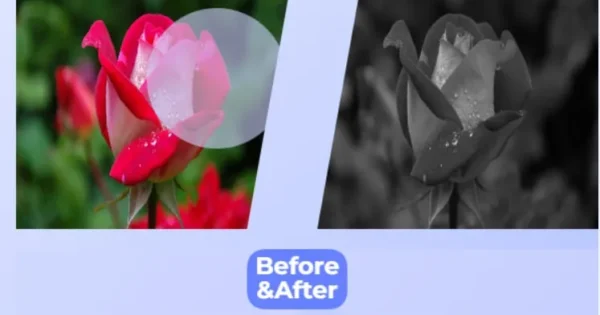
Black and white photography has a unique charm that transcends trends. By stripping away color, it emphasizes contrast, texture, and composition, creating images that are both striking and emotional. Whether you’re enhancing a portrait, a landscape, or an abstract shot, a black and white photo converter can help you achieve this iconic style with ease.
In this comprehensive guide, we’ll explore the art of converting images to black and white, the benefits of grayscale photography, and how to use an online grayscale image converter to transform your photos. Most importantly, we’ll show you why Trevoon’s Black and White Image Converter is the perfect tool to make photos black and white quickly and effortlessly.
Why Choose Black and White Photography?
Before diving into how to convert images to black and white online, let’s explore why this style remains so popular:
- Timeless Aesthetic: Black and white images evoke nostalgia and sophistication, making them ideal for everything from wedding photos to artistic portfolios.
- Focus on Composition: Without color, viewers focus on shapes, lines, and textures, which can make your photos more impactful.
- Emotional Depth: Grayscale images often convey mood and emotion more powerfully, as they eliminate distractions caused by vibrant colors.
- Versatility: Black and white photos suit a variety of genres, including portraits, street photography, and landscapes.
Whether you’re a beginner or a seasoned photographer, a black and white image converter can help you experiment with this classic style without needing advanced editing skills.
What is a Black and White Image Converter?
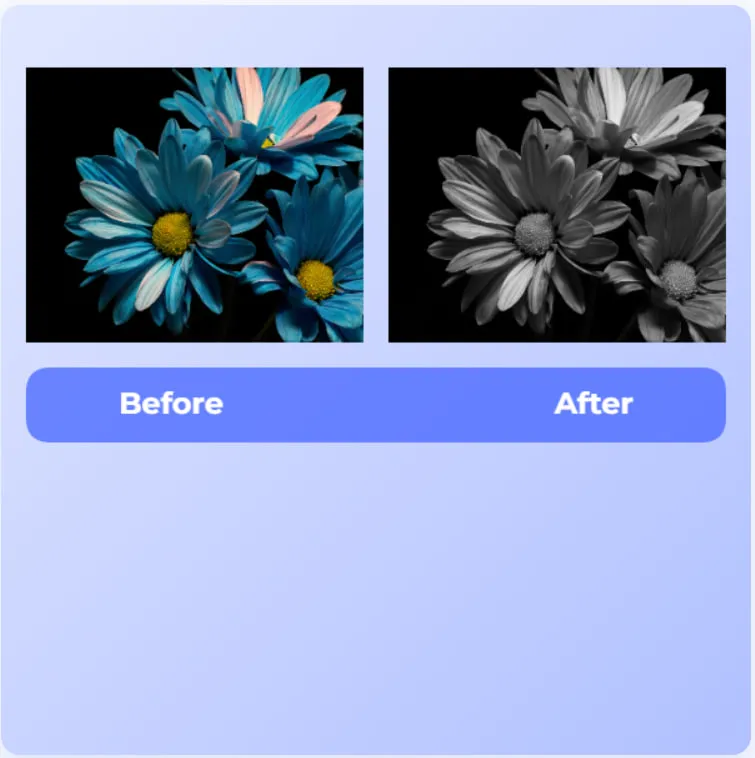
A black and white image converter is a tool that transforms colored images into grayscale or monochromatic versions. These tools work by adjusting the color channels of an image to remove hues while preserving contrast and detail. With the rise of online tools, you can now convert images to black and white online without downloading expensive software.
Our tool at Trevoon is designed to make this process simple, fast, and accessible to everyone. Whether you’re editing a single photo or a batch of images, our online grayscale image converter delivers professional-quality results in just a few clicks.
Benefits of Using an Online Black and White Photo Converter
Using an online grayscale image converter like Trevoon’s offers several advantages:
- Ease of Use: No technical expertise is required. Simply upload your image, and the tool does the rest.
- Accessibility: Access the tool from any device with an internet connection, whether it’s a smartphone, tablet, or computer.
- Speed: Convert images in seconds, saving you time compared to manual editing in software like Photoshop.
- Free to Use: Our tool is completely free, making it ideal for hobbyists and professionals alike.
- High-Quality Results: Preserve the details and contrast of your original image for stunning black and white photos.
With these benefits, it’s no wonder why so many people are turning to online tools to make photos black and white.
How to Use Trevoon’s Black and White Image Converter
Ready to transform your images? Follow these simple steps to use our black and white photo converter:
- Visit the Tool: Go to Trevoon’s Black and White Image Converter.
- Upload Your Image: Click the upload button and select the photo you want to convert. Our tool supports popular formats like JPG, PNG, and more.
- Convert to Black and White: Once uploaded, the tool automatically processes your image, converting it to grayscale while maintaining quality.
- Adjust (Optional): Fine-tune the contrast or brightness if desired to enhance the final result.
- Download Your Image: Save your black and white photo to your device with a single click.
It’s that easy! Whether you’re editing a single photo or multiple images, our tool is designed to streamline the process.
Tips for Creating Stunning Black and White Photos
While our black and white image converter makes the process effortless, a few tips can help you achieve even better results:
- Choose High-Contrast Images: Photos with strong light and shadow play work best in black and white. Think dramatic skies or bold portraits.
- Pay Attention to Texture: Black and white photography highlights textures, so look for subjects with interesting surfaces, like weathered wood or fabric.
- Experiment with Lighting: Soft or harsh lighting can dramatically change the mood of your grayscale image.
- Use the Right Composition: Strong lines, shapes, and patterns stand out in black and white photos, so compose your shots thoughtfully.
- Fine-Tune Contrast: After converting, adjust the contrast to make your image pop. Our tool allows for easy tweaks to get the perfect look.
By following these tips, you can create professional-grade black and white photos using our online grayscale image converter.
Why Choose Trevoon’s Black and White Image Converter?
There are countless tools available to convert images to black and white online, so why choose Trevoon? Here’s what sets us apart:
- User-Friendly Interface: Our tool is designed with simplicity in mind, making it accessible to beginners and experts alike.
- Fast Processing: Convert images in seconds, even on slower internet connections.
- No Watermarks: Your converted images are yours to keep, with no branding or watermarks.
- Privacy First: We prioritize your data security, ensuring your uploaded images are processed securely and deleted after use.
- Completely Free: Unlike many other tools, Trevoon’s converter is free with no hidden fees or subscriptions.
Ready to try it? Head over to Trevoon’s Black and White Image Converter and start creating stunning grayscale images today!
Common Use Cases for Black and White Image Conversion
The versatility of black and white photography makes it suitable for a wide range of applications. Here are some popular use cases:
- Portraits: Black and white portraits emphasize facial expressions and textures, creating a timeless look.
- Artistic Photography: Grayscale images are a favorite among artists for their ability to convey mood and depth.
- Social Media: Stand out on platforms like Instagram with striking black and white posts.
- Professional Projects: Use black and white images in presentations, portfolios, or marketing materials for a polished, professional aesthetic.
- Nostalgic Edits: Transform family photos or old snapshots into classic black and white images for a vintage feel.
No matter the purpose, our black and white photo converter makes it easy to achieve the look you want.
Comparing Black and White Image Converters: Online vs. Software
While online tools like Trevoon’s are incredibly convenient, some users may wonder how they compare to professional software like Adobe Photoshop or GIMP. Here’s a quick breakdown:
| Feature | Online Converter (Trevoon) | Desktop Software (Photoshop/GIMP) |
|---|---|---|
| Ease of Use | Extremely simple, no learning curve | Requires training and experience |
| Cost | Free | Paid (Photoshop) or Free (GIMP) |
| Accessibility | Available on any device | Requires installation |
| Speed | Instant results | Slower, manual editing |
| Advanced Features | Basic adjustments | Extensive editing options |
For most users, an online grayscale image converter like Trevoon’s is the best choice for quick, high-quality results without the hassle of learning complex software.
FAQs About Black and White Image Conversion
1. How do I convert an image to black and white online?
Simply visit Trevoon’s Black and White Image Converter, upload your image, and download the grayscale version in seconds.
2. Is Trevoon’s converter free to use?
Yes, our tool is completely free with no hidden fees or subscriptions.
3. What image formats are supported?
Our converter supports popular formats like JPG, PNG, and BMP.
4. Can I adjust the contrast of my black and white photo?
Yes, our tool allows you to fine-tune contrast and brightness for the perfect look.
5. Is my data safe when using the converter?
Absolutely. We prioritize your privacy and ensure all uploaded images are processed securely.
Conclusion: Transform Your Photos with Trevoon’s Black and White Image Converter
Black and white photography is more than just a filter—it’s a way to tell stories, evoke emotions, and create timeless art. With Trevoon’s Black and White Image Converter, you can make photos black and white with ease, whether you’re a beginner or a seasoned photographer. Our free, user-friendly tool delivers professional-quality results in seconds, making it the perfect choice for anyone looking to explore the beauty of grayscale photography.
Don’t wait to unleash your creativity. Visit Trevoon’s Black and White Image Converter today and start transforming your images into stunning black and white masterpieces!